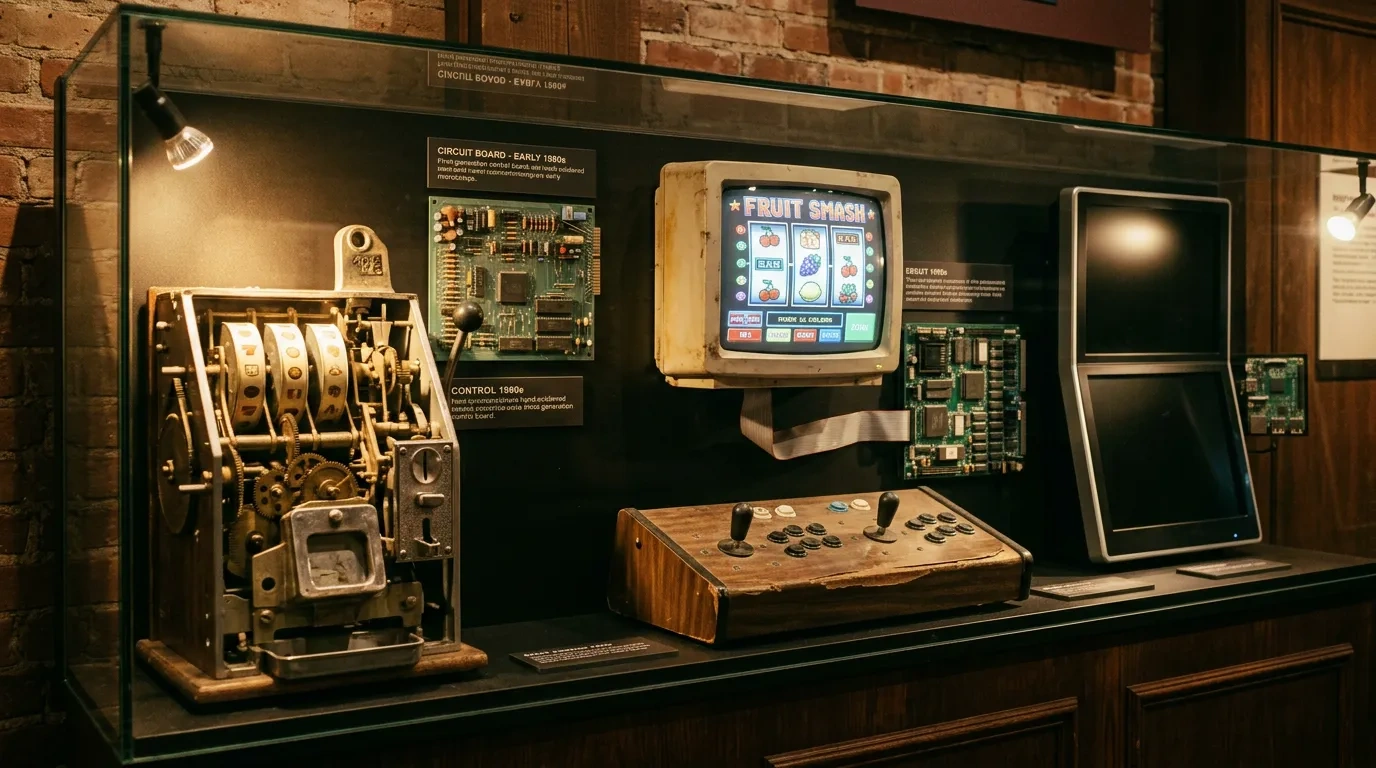
In 1976, Fortune Coin Co. set up a video slot machine in Costa Mesa, California. Earlier machines used spinning reels, but this machine ran images on a modified 19-inch Sony Trinitron television. This change shifted gaming from mechanical parts to software. Designers could change symbols, layouts, sounds, and gameplay by adjusting the electronics.
From Mechanical Reels to the First Video Slot
In the early days of creating slot machines, developers mainly used two approaches: the classic mechanical systems featuring physical reels, and the more modern electronic designs that showed results on screens. In 1976, Fortune Coin Co. introduced a setup featuring an electronic screen rather than the usual spinning reels. The machine featured an altered TV screen that displayed reel symbols in a digital format, making it possible for the game to function without any physical reel parts. This shift allowed designers greater flexibility in handling graphics, symbols, and game displays using electronic elements instead of mechanical ones. It also represented a key move towards the software-based casino games that eventually showed up on video terminals, computers, and mobile devices.
| Earlier Mechanical Slots | Fortune Coin Video Approach |
| Physical spinning reels | Electronic reel images |
| Fixed reel strips | Screen-generated symbols |
| Mechanical movement | Electronic control |
| Physical modifications | Programmable changes |
| Limited visual flexibility | Expanded screen possibilities |
Why the Sony Trinitron Was an Important Choice
Sony Trinitron displays, initially used in casino electronics, introduced color televisions to consumers, expanding home entertainment options and increasing public awareness of these products.
- Television technology became part of interactive gaming;
- Electronics generated casino symbols directly on screen;
- Color screens created more visual flexibility;
- Game information no longer depended on physical reels;
- Display technology became central to casino cabinet design.
Physical Cabinet, Digital Game
The first generation of video slots did not resemble modern tablets or smartphones. Their cabinets were large and heavy, and these early versions were closely related to traditional casino models. As technology inside video slots changed over time, the physical elements of these machines took on new digital roles.
| Physical Element | Digital Function |
| Cabinet | Houses electronics |
| Buttons | Send player input |
| Monitor | Displays game information |
| Speaker | Produces programmed audio |
| Circuit boards | Process game logic |
| Memory chips | Store software |
Casino Electronics Grew Alongside Home Computing
The shift to digital casino tech took place around the same time personal computers and gaming consoles were becoming key elements of American culture. Devices like the Apple II, Commodore models, and Atari 2600 demonstrated that programmable electronics could step out of labs and offices, making their way into homes and places of entertainment. Casino machines came about in this broader tech landscape. Various industries employed a range of hardware setups, yet there were common concepts among them: processors dealt with instructions, memory kept programs, displays presented results, and physical controls relayed user input. This link shows how early casino electronics fit into a bigger picture of how everyday folks in the United States got acquainted with digital technology.
- Processors became affordable enough for dedicated machines;
- Memory chips stored software and game instructions;
- Electronic displays replaced some mechanical indicators;
- Buttons and joysticks became standard digital inputs;
- Games increasingly depended on software rather than moving parts.
Atari, Apple, and Commodore Show the Same Transition
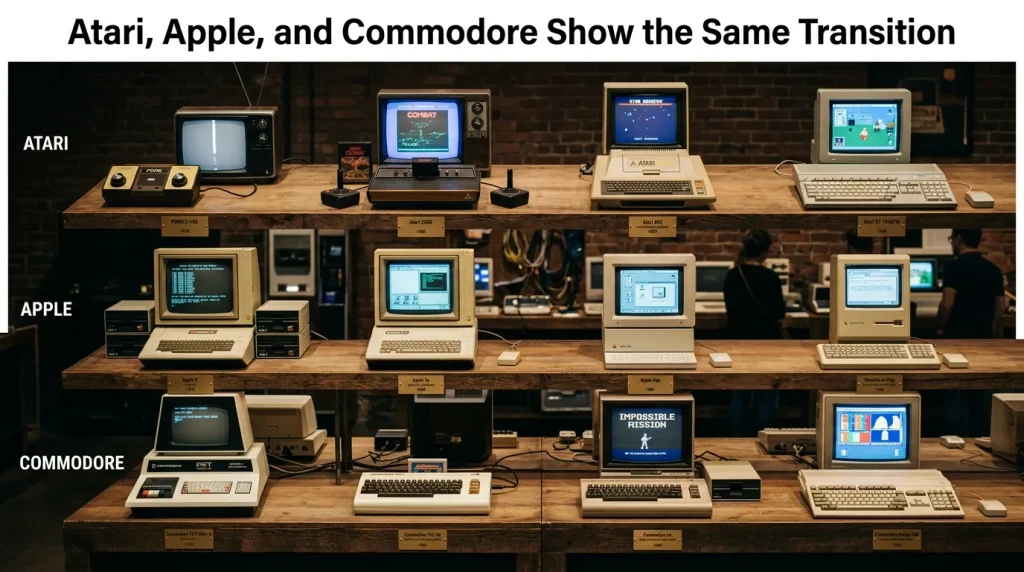
The Mobile Museum of Vintage Technology displays machines that illustrate how electronics changed in the 1970s and 1980s. Each device connects to a stage in that transition. The Atari 2600 introduced cartridge-based games to homes. The Apple II and Commodore computers made personal computers accessible to individuals.
| Vintage Device | Historical Connection |
| Atari 2600 | Dedicated digital gaming |
| Apple II | Early personal computing |
| Commodore systems | Home software and digital media |
| Arcade machines | Screen-based interactive entertainment |
| Early video slots | Electronic casino gaming |
Why Screen-Based Gaming Changed Design
A video display transformed the link between physical construction and game design. Screen-based gaming allowed developers greater flexibility: they could redraw symbols, change colors, and program new visual sequences with software.
- Symbols became software-controlled;
- Themes no longer depended entirely on physical reel strips;
- Information screens changed during play;
- Developers added animations with less effort;
- One hardware format supported different visual designs.
Inside 8-Bit Gaming Hardware
In the late 1970s and 1980s, processors like the Z80 powered computers, arcade machines, and gaming hardware. Early 8-bit systems offered limited processing power, memory, storage, graphics, and sound. EPROM memory held program instructions as well as graphics and sound data on the chips. Developers worked with low-resolution displays and built images from individual pixels. The constraints of 8-bit technology influenced the appearance and sound of games from that period.
| Vintage Hardware | Main Function | Effect on Game Design |
| 8-bit Processor | Executes programmed instructions | Limited game complexity and animation |
| Z80-Era Chips | Handles inputs, logic, and display tasks | Supported programmable electronic devices |
| EPROM Memory | Stores software, graphics, and sound data | Allowed programs to exist on physical chips |
| Limited RAM | Holds active game information | Required compact code and assets |
| Low-Resolution Display | Presents graphics on screen | Produced large, visible pixels |
| Limited Color Support | Controls available screen colors | Encouraged simple, high-contrast artwork |
| Basic Sound Hardware | Generates electronic tones | Created short beeps and simple melodies |
| Small Storage Capacity | Limits available game data | Encouraged repeated graphics and animations |
Shared Visual Limits in Arcade Casino Games
Arcade games rely on graphics, and electronic casino machines do as well. Both types of displays encountered similar challenges because each had to operate within the limitations of available screen technology and memory.
| Arcade Requirement | Casino Equivalent |
| Recognizable characters | Recognizable reel symbols |
| Visible score | Visible credit balance |
| Distinct movement | Distinct reel animation |
| Immediate feedback | Visible result |
| Simple controls | Dedicated betting controls |
Vintage Sound Hardware Created a Distinctive Style
Arcade machines played sounds when players moved, scored points, encountered danger, or completed a level. Early systems could not store audio recordings, so developers made tones, melodies, and simple effects themselves. Electronic casino devices produced sounds for button presses, wins, and shifts in the game state. Modern games combine music, recorded voices, and layered effects.
- Short tones indicated actions;
- Different pitches represented different events;
- Repetition conserved memory;
- Synthetic sound replaced recorded audio;
- Audio reinforced visual feedback.
Physical Buttons Defined the Early User Interface
Vintage gaming controls included buttons, switches, and joysticks. Each control type served a specific function, and controls provided users with a physical response to their actions. Touchscreens were uncommon during that time.
| Vintage Control | Function |
| Joystick | Directional input |
| Push button | Action command |
| Toggle switch | Mode selection |
| Keyboard key | Text or function input |
| Casino button panel | Betting and game control |
Modern Slots Add Animation and Complex Visual Systems
Earlier developers could not achieve the same level of detail due to limited processing power. Today, modern online slots use detailed artwork, 3D-style animation, cinematic transitions, layered soundtracks, and complex bonus sequences. A phone calculates and displays thousands of visual elements on its screen, maintains a secure network connection, and runs account services in the background. Games can change their visual layout during play without physical modification. Software determines what appears on the display, and the screen is the main surface for players to view game information, use controls, and see outcomes.
- High-resolution animation;
- Video sequences;
- Layered soundtracks;
- Expanding reel layouts;
- Interactive bonus screens;
- Adaptive information panels.
BetMGM Shows the Shift From Cabinet to App
Players now access games through software on their phones or tablets. Gaming hardware is no longer required. BetMGM Casino reflects a change in how people approach casino games. Eligible users can play without needing a separate cabinet for each game.
| 1970s Video Slot | Modern Casino App |
| Dedicated cabinet | General-purpose phone |
| One main game | Large digital catalog |
| Local controls | Touch interface |
| Fixed hardware | Software-based navigation |
| Physical servicing | App updates |
DraftKings Illustrates the Software Catalog Model
The DraftKings Casino app marks another step in the shift to gaming defined by software. Instead of linking just one cabinet to each game, players can explore various titles through one digital menu where access to the casino is allowed by law. Categories might consist of slots, online table games, live dealer options, and formats based on the rules of the area and the latest collection. The device itself doesn’t change, but the software alters nearly everything you see on the screen. This stands in stark contrast to the era, a time when game ideas frequently called for entirely new parts. Apps can shuffle categories, add new titles, or tweak interface elements without having to swap out the phone itself.
- One device supports many games;
- Menus organize large digital catalogs;
- Developers add new titles through software;
- Account functions appear beside game categories;
- Physical hardware remains unchanged.
Gonzo’s Quest Shows What Animation Added
Gonzo’s Quest highlights differences in slot presentation compared to early video machines. Modern slot games use dynamic elements like characters, environmental effects, cascading symbols, animated transitions, and bonus sequences. These features require advanced memory and graphics capabilities not present in early electronic systems. Games must convey familiar information such as stake, symbols, outcomes, and feature activation. Modern games achieve this with a richer visual vocabulary, and modern animation builds on screen-based principles established decades ago rather than completely replacing them.
| Early Video Slot | Modern Animated Slot |
| Basic reel movement | Cascading or animated reels |
| Limited colors | Detailed artwork |
| Simple sound | Layered audio |
| Static symbols | Animated characters |
| Minimal transitions | Cinematic sequences |
Megaways Demonstrates the Freedom of Digital Reels
A mechanical reel holds a fixed strip and maintains a constant size. A digital reel, however, can adjust its height or shift symbols if permitted by the rules. The flexibility of digital reels began in 1976 with the introduction of video displays. Initially, developers recreated three-reel machines on screens, but over time, they moved away from direct copies of physical machines. Screens began to be used for games without physical counterparts. Megaways slots illustrate the impact of transitioning from physical reels to digital ones.
| Reel Generation | Main Characteristic |
| Mechanical reel | Fixed physical strip |
| Early video reel | Screen imitation of traditional reels |
| Multi-line video slot | Expanded paylines |
| Cascading slot | Symbols disappear and refill |
| Megaways format | Variable reel structures |
RNG Logic Connects Early Electronics and Modern Software
Random number generation plays a central role in regulated digital games. These systems rely on software, regulatory testing, and security controls. Slot machines no longer use physical reels, as gaming has shifted to computer-based outcomes. Now, computers decide the result of each game, and the screen animation shows what happens.
- Game logic operates behind the display;
- Screen animation presents game information;
- Electronics generate outcomes;
- Visual effects do not function like physical reel momentum;
- Modern systems use more advanced testing and software controls.
Hands-On Vintage Technology Museum
Interactive technology allows people to operate hardware directly with their hands, not just through a screen. When someone physically interacts with the collection, they discover details that are not visible through observation alone.
| Hands-On Element | What Visitors Notice |
| Vintage keyboard | Key travel and sound |
| Joystick | Physical resistance |
| CRT display | Size and image character |
| Computer case | Weight and construction |
| Original controls | Dedicated hardware functions |
Vintage Games Help Explain Digital Literacy
The museum’s vintage video games demonstrate how entertainment teaches interaction with digital systems: before smartphones, players learned to recognize icons, scores, menus, status information, electronic sounds, and immediate visual feedback. Vintage game concepts are related to modern interfaces.
| Vintage Game Concept | Modern Interface Equivalent |
| Score display | Account balance |
| Game menu | App navigation |
| Status icon | Notification |
| Button press | Screen tap |
| Level change | Interface transition |
The Museum Travels Across the United States
The Mobile Museum of Vintage Technology USA is meant to move around instead of sticking to a single exhibition location. Computers, consoles, screens, gadgets, software, and other materials are carefully packed into cases for transport throughout the continental United States. This lets the collection show up at conferences, festivals, exhibitions, educational events, and various public gatherings. A traveling exhibit delivers the story of technology right to people, so they don’t have to visit just one museum. It also lets the collection join wider discussions around computing, engineering, gaming, digital culture, and shifts in technology.
| Event Type | Possible Museum Role |
| Technology conference | Interactive historical exhibit |
| Festival | Public hands-on attraction |
| School event | Educational demonstration |
| Engineering event | Hardware history display |
| Gaming convention | Retro gaming section |
| Community exhibition | Accessible technology history |
Apple and Commodore Document the Rise of Personal Computing
The Apple II and Commodore computers were released during the rise of home, school, and workplace computer use. Prior to this, computers were primarily found in institutions. People utilized these computers for games, learning, work, and experimentation. The significance of the 1970s and 1980s is highlighted for today’s digital culture.
| Personal Computer Feature | Historical Importance |
| Keyboard input | Direct user control |
| Software loading | Multiple functions |
| Digital storage | Reusable data |
| Screen output | Interactive information |
| Home ownership | Wider public access |
Floppy Disks Show How Storage Has Changed
Floppy disks are older technology compared to current technology. In the past, people used floppy disks to save programs and files. Storage devices from the floppy disk era had different capacities than today’s devices. The list below outlines the characteristics of floppy disks.
- Physical removable media;
- Limited storage capacity;
- Manual file transfer;
- Vulnerability to damage;
- Direct connection between software and physical media.
From Trinitron Screens to Modern Touch Displays
More than fifty years passed between the days of the Sony Trinitron and the arrival of touchscreen technology. Early video slot machines, for example, used a television set inside a cabinet. Now, one phone can do more. It brings together the display, input, processing, storage, communication, and audio. The display is no longer an output. It has become an active control surface, so users can do more than use a set of buttons.
- CRT display → flat touchscreen;
- Physical button → digital control;
- Dedicated machine → multifunction device;
- Fixed software → downloadable applications;
- Local electronics → connected services.
Why Preserving Vintage Technology Still Matters
Saving vintage technology isn’t just about looking back fondly. Surviving computers, consoles, storage media, monitors, controllers, and early electronic games show tangible proof of how today’s digital systems came to be. After you’ve used a mechanical keyboard, you start to really appreciate a touchscreen. Modern graphics really come to life when you take a look at what developers have done using just a few pixels. Big digital game collections really stand out when you take a closer look at the hardware that kept the software on cartridges or EPROM chips. Preserving these objects helps visitors follow the journey of technological progress through actual machines, rather than just depending on photos or written descriptions.
| Preserved Technology | Modern Connection |
| CRT display | Smartphone screen |
| Cartridge | Digital download |
| Joystick | Touch control |
| EPROM | Flash storage |
| 8-bit processor | Mobile CPU |
| Pixel graphics | High-resolution animation |
FAQ
What was the first video slot machine?
Fortune Coin Co. introduced the first video slot machine in 1976. The machine used a modified 19-inch Sony Trinitron color television and displayed electronically generated reel images, so it did not rely entirely on traditional physical reels.
How is vintage computer technology connected to video slots?
As computer technology advanced, electronic casino machines started to incorporate processors, memory chips, displays, software, and controls. The same components appeared in home computers, game consoles, arcade machines, and video slots.
Can visitors use equipment at The Mobile Museum of Vintage Technology?
At the Mobile Museum of Vintage Technology, visitors use computers, controllers, keyboards, and other devices. The museum lets people interact with equipment, so they can see how technology from generations looked, sounded, and worked.